tinyUSBboard - the DIY AVR (VUSB) board

Navigation by WebRing.

Infopage


Arduino compatible without extra programmer and/or FTDI chip (USB<->serial) needed!

Do you have some ideas for further example firmwares - or even completed ones already? Please send them to me.


Introduction - What is tinyUSBboard?

TinyUSBboard is an Arduino compatible, minimalistic and cheap AVR microprocessor board with USB interface and simple "do it yourself" capability.
It utilizes directly features of USB without FTDI chip and/or any USB to serial converter. It can be programmed via assembler, C, Arduino or of course BASCOM.
All its components you need to construct it are universal and available nearly everywhere - no special PCB needed.
It is well suited for beginners to learn AVR microcontroller programming and/or it can be used on solderless breadboards very simple to do various projects.
For example using some firmware provided on this site turns it into a programming hardware for blank AVR microcontrollers, which can be used to produce further tinyUSBboards for family members, friends or collegues...

While normal handling with microcontrolling units (MCUs) needs additional equipment, tinyUSBboard only needs a Mac-, Windows- or Linux computer with a single free USB socket.

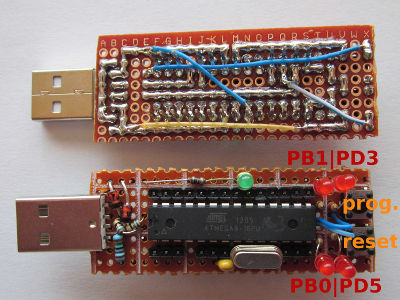
The board (see photo and layout) in form of a regular stick (approx. 2.5cm x 8.0cm) uses an ATmega8-16PU MCU, clocked at 16MHz.
This IC allows up to 8kib of programmed code within its flash-memory.
It also has additional 512byte persistent electronical eraseable memory (EEPROM) and 1kib volatile memory RAM.
(For further features see its datasheet in the datasheet-section).

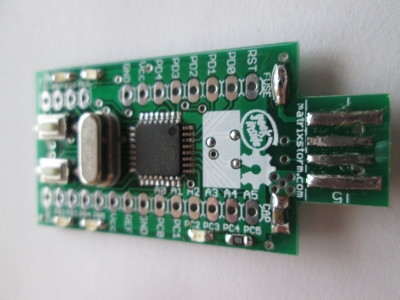
Of course it is possible to use tinyUSBboard with other microcontrollers (for example ATmega328), too. For details contact me.

Three of the MCUs pins (PIN2, PIN12 and PIN13) are actually used for the USB interface.
This feature and using the latest, preflashed bootloader "USBaspLoader" (https://github.com/baerwolf/USBaspLoader) allows convenient and fast programming via USB, again and again:
Just press (keep pressed) the program-button and reset (or powerup) the stick.
The bootloader, emulating an usbasp-programming hardware, will take over and allows (re)programming the MCU.
(Once started, of course, the prog-button can be released. Any repeated press (or "reset") then will exit the bootloader.)

Furthermore, there are five LEDs on the board. One LED indicates the power supply via USB.
The other four (red) LEDs are connected to and can be controlled via the IO of the microcontroller (PB0, PB1, PD3 and PD5).
If in any circumstances only the direct contacts of the controller are required, LEDs can be disconnected permanently.

The bootloader occupies 2 of the 8 kib of flash memory.

go to: the top of this page

Advantages against other AVR VUSB boards

Althought there are lots of AVR boards available, tinyUSBboard has because of its special design and the complete revised sourcecode of USBaspLoader some unique advantages against other AVR VUSB boards. A list with the most outstanding ones is collected here.

Hardware advantages:

Software advantages:


In case you have some comments to this section (more advantages? disadvantages?) please share them with me.


go to: the top of this page


Pictures

tinyUSBboard_group

tinyUSBboard

tinyUSBboard_male

tinyUSBboard_female

tinyUSBboard_socket


Revision2:

tinyUSBboard_rev2_schematic


If you experiencing instabilities during operation (ATmega8A, ATmega328p?) put some capacitor with 0.1uF or more somewhere near the microcontroller between Vcc and GND. (For example between PIN 7 and PIN 8)


tinyUSBboard_rev2_full

tinyUSBboard_rev2_links

tinyUSBboard_rev2_solder

tinyUSBboard_rev2_backside


go to: the top of this page


List of components

In case you need some parts to build your own tinyUSBboard or you are unsure about sth., contact me...
The components are listed in blocks of recommended construction order. Total value should be less than $6.

If you want to build your own board(s) you may want to check out my construction-part sets available on ebay.
In larger quantities and multiples of 4 to 8 pieces, the components become even more cheap! (About $2 less per board.)

Per board you basically will need:


For soldering you may also need about 0.75m to 0.85m of (1mm in diameter) Sn60Pb40 solder wire, which is however not seen as a component here.
If you experiencing instabilities during operation (ATmega8A, ATmega328p?) put some capacitor with 0.1uF or more somewhere near the microcontroller between Vcc and GND. (For example between PIN 7 and PIN 8)


go to: the top of this page


Useful addons for tinyUSBboard

Even tinyUSBboard can be used standalone with just one USB-capable computer necessary, you might want to extend playing with it.
Some useful first-step hardware addons are collected here:


For further suggestion please contact me.


go to: the top of this page


Some interesting material


go to: the top of this page


Related projects


go to: the top of this page


Datasheets


go to: the top of this page


Firmwares


go to: the top of this page


Example firmwares


go to: the top of this page


USBaspLoader updates specifically for tinyUSBboard

In normal mode of operation the bootloader (USBaspLoader) protects itself from being overwritten due normal uploads.
In order to update your tinyUSBboard's bootloader you first have to upload a special "updater"-firmware.
This procedure is exactly the same as uploading a normal firmware.

After the "updater" is uploaded, the bootloader has to be exitted to start the just programmed firmware. (Replug or reset the board.)
When the "updater" takes over control (LED on PD5 flashes), it first checks the current installed bootloader with the one contained within the "updater".
If both are identical, no writing is performed and it stops working by signalling "operation complete" (LED on PB0 flashes, too).
If there are differences it starts overwriting the existing bootloader with the new one. WARNING: In this phase the board should not be disconnected from power until it signalls "success" by flashing the LED on PB0.(LED on PB1 only flashes when update was done).

The procedure can be repeated some times (since the updater checks before write), until the updater haven't done any change anymore and it only signalls completition with LEDs PB0 and PD5. (PB1 will not flash).
After this it is save to upload (and overwrite the "updater" with) new firmwares by the user...

In order to protect the bootloader on tinyUSBboard from wrong "updates", which do not meet the necessary conditions (PIN layout, clock ...etc...), since version v0.9 it uses a magic value. This magic will prevent the old bootloader from being replaced by some inappropriate one (which results in loosing access to the board).


Revision 2 and older


Revision 3 and newer


ATmega328P version


go to: the top of this page


Other controllers for revision 3

Revision 3 will swap connections of PD6 and PD7 in order to enable even more functions of the MCU.
(It is possible to use the internal analogous comperator module)
If you experiencing instabilities during operation (ATmega8A, ATmega328p?) put some capacitor with 0.1uF or more somewhere near the microcontroller between Vcc and GND. (For example between PIN 7 and PIN 8)

tinyUSBboard_rev3_schematic


Other default- and bootloader firmwares only are provided for revision 3.
Most of them are still inofficial and need further testing.
If not noted otherwise, example binaries/hexfiles are always compiled for ATmega8.

An arduino hardware description also is available for ATmega8 and ATmega328P only.


go to: the top of this page


Programming in C (or assembler)

In order to program appropriate firmwares for tinyUSBboard, you can choose out of many programming languages.
If you want to use famous C language you might want to do this via open source avr-libc and its chain of tools.

Since the toolchain just generates the binary-data, you still need a piece of software to bring it into the MCU.
Because there are some major differences between the available platforms, the following subsections will explain some tools doing the job...

If you want to have some empty skeleton to start with your firmware, you might want to look at my avrskeleton at github.
(Just define environment variable "AVR8TOOLCHAINBINDIR" with the PATH to your toolchain binaries and the Makefile will do everything else.)

In case you want to see/experiment or just play with AVR assembler you can try out this.

Linux

Atmel offers directly two precompiled avr-libc toolchain versions for linux.
One LZMA recompressed version for 32bit systems is available here, and another for 64bit here.

For flashing the data into tinyUSBboard you can use AVRDUDE.
(avrdude -c usbasp -p atmega8 -D -U flash:w:main.hex)

Windows

For using tinyUSBboard with Windows, you first have to install some usb-drivers.

A good programming software I recommend as graphical replacement for avrdude is KhazamaAVRProgrammer (link).

Even there is also an avr-libc port (avr-toolchain-installer-3.4.2.1573-win32.win32.x86) available for Windows, you might try out Atmels AVR Studio

Mac

Using tinyUSBboard with Mac is completly untested. For reports I would be very thankful.

Under Mac you can try (use?) CrossPack for AVR® Development.
It runs on Mac OS X 10.6 or higher and promises to be similar to AVR Studio on Windows.


go to: the top of this page


Programming in Arduino

"Arduino is an open-source electronics prototyping platform based on flexible, easy-to-use hardware and software. It's intended for artists, designers, hobbyists, and anyone interested in creating interactive objects or environments."

How you can download the appropriate arduino-ide version for you will be explained in the following subsections.
Before you can start using arduino-ide after downloading and extracting it, you have to extend the list of know boards to arduino.

Therefore all you need to do is to extract this zip-file (or this tgz) into your arduino directory.
This is the new and recommended way to use tinyUSBboard within arduino IDE.

The old way was to copy this text below into "/arduino-####/hardware/arduino/boards.txt".
(Or to use this patch.)


Please also note the different PIN-names (compared to the datasheet) in arduino. (See more)

arduinomapping


Arduino for Windows

Here you can download the arduino-ide for windows.

Arduino for Linux

Arduino for Linux is available in two versions: One for 32bit systems, and another for recent 64bit technology.

Arduino for Mac

Arduino for Mac OS X


go to: the top of this page


File-Mirrors

For the moment all arduino and avr-libc toolchain files are mirrored within an GMX mediacenter. HERE


go to: the top of this page


Contact

In case you have any problems/trouble and/or need some help,
in case you have remarks or you want to participate tinyUSBboard-project,
in case you need some parts to build your own tinyUSBboard,
you can contact Stephan Bärwolf via:

If you want to use PGP, my key-id is 0xFB9B12DB.
The corresponding fingerprint must be: 2252 B41E 12DF 41AD 476F 7F36 084A 0911 FB9B 12DB


go to: the top of this page


my-Gaestebuch.de

using my-gaestebuch.de

last change: 05/20/2013 (MDY) 23:59 UTC